

Growing your gutter or roofing business beyond your current territory sounds like a straightforward path to more revenue. In practice, it often means longer drive times, thinner margins, and crews showing up to jobs that barely cover fuel costs. The difference between profitable expansion and expensive sprawl comes down to preparation, data, and the right software tools. This guide walks you through a proven, step-by-step approach to expanding your service area without sacrificing the efficiency and profitability you've already built.
Table of Contents
- Assess readiness for service area expansion
- Validate demand in new territories
- Choose the right software for lead management and route optimization
- Measure marketing ROI to guide expansion decisions
- A fresh perspective on service area expansion
- Take your expansion further with RidgeIQ
- Frequently asked questions
Key Takeaways
| Point | Details |
|---|---|
| Route density first | Maximize jobs per route in your core area before expanding to new territories for sustained profitability. |
| Test demand in new areas | Validate market potential with targeted small campaigns before investing heavily in expansion. |
| Choose scalable software | Select lead management and routing tools based on your company size and expansion goals. |
| Use ROI data | Track PPC and SEO performance from each area to guide growth decisions and maximize profits. |
Assess readiness for service area expansion
Before you draw a bigger circle on the map, take an honest look at how well your current territory is performing. Many owners assume that adding zip codes automatically adds revenue. The reality is that if your existing routes are inefficient, expansion will only amplify those problems.
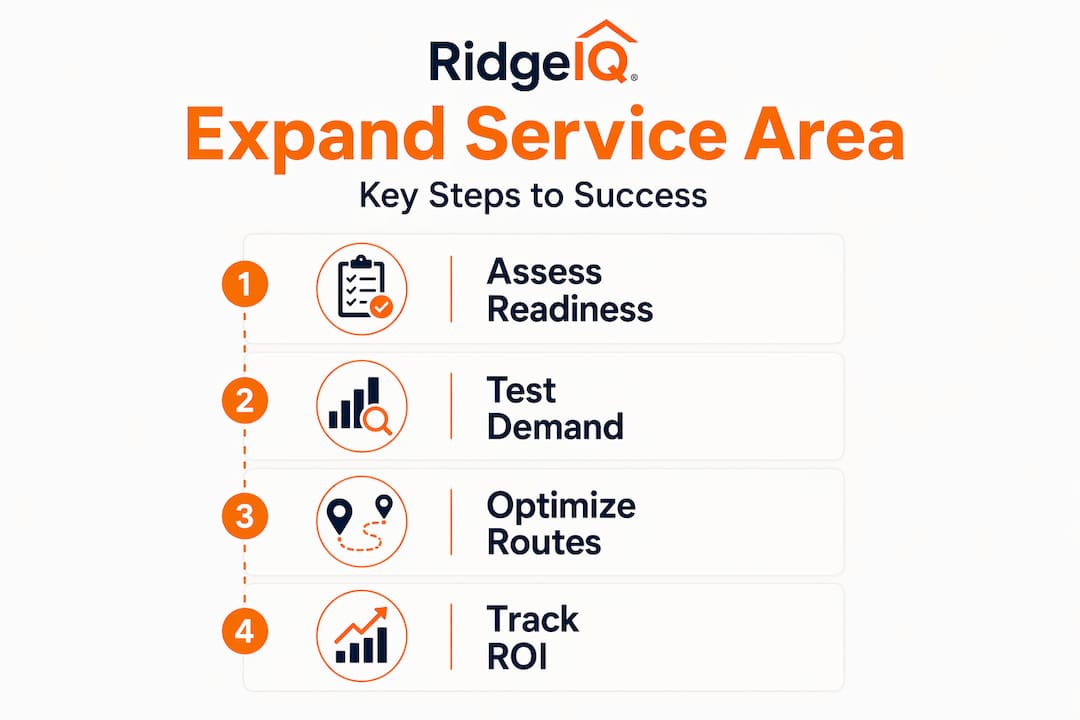
Route density is the single most important metric to evaluate first. Route density measures how many jobs your crews complete per route, per day, in a defined geographic area. A crew that completes six jobs in a tight cluster earns far more than one completing six jobs spread across 40 miles. Prioritize route density before expanding distance: maximize jobs per route in core areas before adding new territories to maintain profitability.
Here is a quick readiness checklist to evaluate before you expand:
- Booking rate: Are you converting at least 30-40% of inbound leads in your current area?
- Average job value: Is your ticket size consistent and growing quarter over quarter?
- Crew efficiency: Are crews finishing scheduled jobs without overtime or rescheduling?
- CRM system: Do you have a roofing CRM for small teams in place to track leads, jobs, and follow-ups?
- Measurement tools: Are you using AI-powered or satellite measurements to speed up quoting?
- Scheduling software: Can your dispatcher handle 20% more volume without breaking down?
If two or more of these items are weak, fix them first. Expanding into new territories with a shaky foundation is one of the fastest ways to burn cash.
| Readiness factor | Ready to expand | Needs work before expanding |
|---|---|---|
| Route density | 5+ jobs per route daily | Fewer than 3 jobs per route |
| Booking rate | 35%+ conversion | Below 25% conversion |
| CRM in place | Yes, actively used | No or rarely used |
| Crew capacity | 10%+ headroom | At or over capacity |
| Average job value | Consistent and growing | Inconsistent or declining |
Pro Tip: Run a 30-day route audit before making any expansion decisions. Log every job address, drive time between stops, and total miles per crew. The data will tell you exactly where you are leaving money on the table in your current area.
Validate demand in new territories
Once readiness is established, testing demand in new areas helps minimize risk and avoid costly expansion failures. Many owners skip this step and commit to new territories based on gut feeling or a few referrals. That approach leads to underbooked crews, wasted marketing spend, and frustrated salespeople.
The smarter move is to run small test campaigns in adjacent zip codes, monitor lead quality, booking rates, and profit per location before full expansion. Think of it like a soft launch for a restaurant. You test the menu before you open a second location.
Here is a step-by-step process for validating demand before committing to a new service area:
- Select two to three adjacent zip codes that border your current territory and show residential density on a map.
- Run a targeted PPC or Facebook campaign for four to six weeks with a modest budget, $500 to $1,000 per zip code is enough to generate meaningful data.
- Track lead quality separately for each zip code using your CRM or a simple spreadsheet. Note lead source, job type requested, and whether the lead converted.
- Calculate profit per location by subtracting drive time costs, labor, and materials from the revenue generated in each test area.
- Compare booking rates between your test zip codes and your core territory. A significant drop in booking rate often signals lower demand or stronger local competition.
- Decide with data, not intuition. If a zip code delivers booking rates and profit margins within 15% of your core area, it is worth pursuing. If it falls short, move on to the next candidate.
"Market expansion fails when routes are inefficient. Software helps enforce profitable density zones, keeping crews productive and margins intact."
Accurate property data matters enormously during this phase. Using tools that provide satellite measurement accuracy lets you quote jobs in new zip codes without sending a crew out for a physical measurement. That alone can cut your cost-per-lead in test markets by a significant margin.
| Test zip code | Leads generated | Booking rate | Avg job value | Est. profit per job | Expand? |
|---|---|---|---|---|---|
| Zip A | 18 | 38% | $1,450 | $520 | Yes |
| Zip B | 12 | 22% | $1,200 | $310 | No |
| Zip C | 21 | 41% | $1,600 | $580 | Yes |

The table above illustrates what a real test market comparison might look like. Zip B underperforms on both booking rate and profit per job. Expanding there would dilute your overall margins. Zip A and Zip C show strong potential and are worth adding to your territory. Use your roofing lead generation strategy to keep the pipeline full once you commit to a new area.
Choose the right software for lead management and route optimization
With market testing underway, selecting the right software makes expansion execution possible and scalable. The wrong platform can create more administrative work than it solves, while the right one practically runs your expansion on autopilot.
Here is a breakdown of the major platforms and where they fit:
| Platform | Best for | Lead automation | Route optimization | Measurement tools |
|---|---|---|---|---|
| ServiceTitan | Multi-location enterprises | Strong | Strong | Integrations available |
| Jobber | Mid-size growing companies | Moderate | Moderate | Limited |
| Housecall Pro | Small to mid-size teams | Moderate | Basic | Limited |
| RidgeIQ | Roofing and gutter specialists | Strong | Via integrations | AI-powered, built-in |
ServiceTitan fits scaling enterprises with multi-location needs, while Jobber and Housecall Pro serve mid-size companies looking for steady growth. Both are solid general-purpose field service platforms.
RidgeIQ, on the other hand, is purpose-built for roofing and gutter contractors. That specialization matters when you are expanding. Generic platforms force you to build workarounds for industry-specific tasks like instant online quotes, insurance scope comparisons, and AI-powered property measurements. RidgeIQ handles all of that natively. Learn more about what RidgeIQ does and how it fits into a growth-focused operation.
Key features to prioritize when evaluating software for expansion:
- Lead capture automation: Can the platform capture leads from your website, Facebook ads, and QR codes simultaneously?
- CRM with pipeline visibility: Can you see where every lead stands across multiple service areas in one dashboard?
- Instant online quoting: Can prospects get a quote without a sales call, reducing friction and improving conversion?
- Integration with existing tools: Does it connect with platforms like JobNimbus, AccuLynx, GoHighLevel, or Leap?
- Push notifications: Does the system alert your team the moment a new lead comes in from a new territory?
Pro Tip: Choose software based on where you want to be in 18 months, not where you are today. If you plan to operate in five territories, pick a platform that handles multi-area lead management now. Migrating software mid-expansion is painful and expensive. Browse roofing software guides to compare your options before committing.
Measure marketing ROI to guide expansion decisions
Software improves execution, but it is critical to measure your marketing returns so expansion delivers measurable profit. Too many contractors expand their service area, spend on ads, and then evaluate success based on total revenue rather than profit per territory. That approach masks underperforming areas until the damage is already done.
Home service marketing ROI benchmarks show PPC returning around 200% and SEO delivering between 317% and 1,389% depending on the market and competition level. These numbers give you a baseline to judge whether your campaigns in new territories are performing at industry standards or falling short.
Here is a step-by-step process for tracking marketing ROI by zip code during expansion:
- Tag every lead by source and zip code in your CRM from day one. This is non-negotiable. Without clean data, you cannot make accurate decisions.
- Calculate cost per lead by territory. Divide your ad spend in each zip code by the number of leads generated. A rising cost per lead in a test area is an early warning sign.
- Track job cost per territory. Include drive time, labor hours, materials, and overhead. A job that looks profitable on paper can turn negative once you add 45 minutes of drive time each way.
- Calculate profit per zip code monthly. Revenue minus all costs, including marketing spend and drive time, gives you the true picture of each territory's contribution.
- Compare against your benchmarks. If your core territory generates $800 average profit per job and a new zip code generates $450, you need to either improve efficiency there or deprioritize it.
| Territory | Ad spend | Leads | Bookings | Revenue | Total cost | Net profit | ROI |
|---|---|---|---|---|---|---|---|
| Core area | $1,200 | 42 | 17 | $24,500 | $14,100 | $10,400 | 766% |
| New zip A | $800 | 21 | 8 | $11,600 | $7,200 | $4,400 | 450% |
| New zip B | $600 | 9 | 2 | $2,900 | $2,800 | $100 | 17% |
New zip B in the table above is a clear underperformer. The ROI is nearly zero, and the low booking rate suggests either weak demand or strong local competition. Pulling back on that territory and reallocating budget to zip A makes obvious financial sense. Tools that offer roof measurement savings can further improve your margins in new territories by cutting the cost of quoting. You can also review a direct RidgeIQ vs Roofr comparison to see where the cost and feature differences matter most for your operation.
A fresh perspective on service area expansion
Most expansion advice focuses on tactics: run ads here, hire another crew, buy a bigger van. What gets far less attention is the mindset trap that causes most expansions to fail quietly.
The trap is chasing volume instead of density. Owners see a new neighborhood with lots of roofs and assume it means lots of revenue. But expansion fails when routes are inefficient, specifically when crews drive past nearby jobs to reach distant ones, burning time and fuel while the schedule looks full on paper. Software that enforces geographic density zones is one of the most underused tools in the industry. It sounds technical, but it simply means your scheduling system flags jobs that fall outside your profitable radius and prompts a decision before they get booked.
The other overlooked factor is market selection criteria. Most owners evaluate new areas based on population alone. A smarter approach is to evaluate population density, income levels, competition, and labor availability before entering any new market. A high-income suburb with aging roofs and only two local competitors is a far better target than a dense urban area where five established companies are already fighting for the same leads.
There is also a timing issue that rarely gets discussed. Expanding during your busy season feels natural because revenue is flowing. But the best time to test new territories is actually during your slower months. You have crew capacity to absorb new jobs, your team has time to learn new routes, and you can evaluate demand without the pressure of peak season workloads. Using a CRM built for expansion lets you track new territory performance separately from your core area, so you get clean data without mixing results.
The contractors who scale successfully are not the ones who move fastest. They are the ones who move with the most information.
Take your expansion further with RidgeIQ
Expanding your service area is one of the highest-leverage moves you can make as a gutter or roofing contractor. But it only pays off when you have the right systems behind it.
RidgeIQ is built specifically for roofing and gutter companies that want to grow without losing control of their lead pipeline. The platform combines AI-powered satellite measurements, instant online quoting, website and Facebook lead capture, CRM tools, and push notifications into one system designed for field service expansion. Integrations with JobNimbus, AccuLynx, GoHighLevel, and Leap mean RidgeIQ fits into your existing workflow without disruption. Whether you are testing two new zip codes or managing five active territories, your roofing lead generation process stays organized, automated, and profitable. Book a demo to see how RidgeIQ supports smart, data-driven service area growth.
Frequently asked questions
How do I know if my current routes are dense enough for expansion?
Track the number of jobs per route in your main area. If most crews must drive long distances between stops, focus on boosting core density before expanding into new territories.
What metrics should I monitor when testing new service areas?
Monitor lead quality, booking rates, profit per job, and overall ROI from each campaign. Validate demand by running limited campaigns in adjacent zip codes before committing to full expansion.
Which software helps with route density and lead automation for mid-size companies?
Jobber and Housecall Pro offer scalable solutions for mid-size growth, while ServiceTitan fits enterprises with complex multi-location requirements and higher administrative demands.
What is considered a good ROI when marketing in new service areas?
Typical home service benchmarks show PPC returning 200% and SEO delivering between 317% and 1,389%, which gives you a solid baseline for evaluating new territory campaigns.